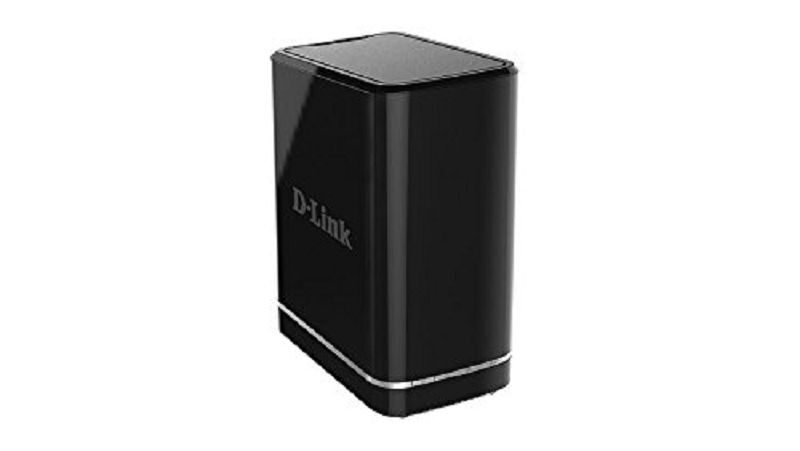
D-Link NVR For Cameras 2 Bay DNS 722-4
USD $240.00
Condition : New
Free Shipping
{{variant_type_name}} :

Notify me when the price drops
We will email you if we find a lower price on this product!
D-Link NVR For Cameras 2 Bay DNS-722-4 When coupled
with D-Link’s high-resolution and feature-rich IP cameras, the
Network Video Recorder (NVR) offers a comprehensive video display,
storage, and management solution. The D-Link NVR provides reliable
high-quality remote monitoring functionality at a fraction of the
cost of conventional surveillance systems. Instant Live View D-Link’s intuitive GUI interface
simplifies viewing live and recorded video from the NVR. The camera
status page shows connection and recording status, along with frame
rate and bit rate information for each camera. Total available
recording time for the system is also clearly displayed for each NVR. Live Monitoring & Camera
Adjustment Users are provided with a variety of
options for viewing and organizing camera footage on-screen. For a
system with multiple channels, users can simply drag and drop
selected cameras to the viewing area. Camera names and recording
status is displayed via OSD to aid in identification. Presets from
within the interface can be set to instantly restore a previously
saved view. A single camera may be viewed
full-screen with optional two-way audio. Users can control
pan/tilt/zoom (PTZ) functions from within the interface using the
provided interface buttons or by directly clicking on the video. Extensive Recording Functionality A clear single-page interface assists
with configuration including compression, resolution and frame rate
for all connected cameras. The NVR records video from up to 8 local
and remote IP cameras. A total of 2 NVRs can be combined and
administered with D-Link’s bundled 16 channel management software. Once cameras have been set up, a
highly configurable scheduling system allows for continuous recording
or recording during specifically allotted timeframes. Each camera can
be set to record independently at preset intervals. The NVR also
provides event recording based on specific triggers. The NVR can be configured to overwrite
the oldest data automatically when HDD space runs out, allowing for
continuous and uninterrupted recording. Users can specify the number
of days the recording should be kept (within the limits of the HDD
capacity). For example, if the NVR has the capacity to store 7 days
of recording, using the overwrite option, the NVR will record the 8th
day and delete the 1st day. The NVR also provides the option to
stop recording when the HDD is full. Should the disk reach capacity,
a notification can be sent via e-mail or to an external device such
as an audible alarm or LED display via a DI/ DO interface only. Powerful Event Management The NVR centrally controls the digital
output, e-mail notifications and recording for all the connected
cameras. Input triggers from camera motion detection or digital input
interfaces can additionally be monitored. These events will be
logged, with optional notifications via e-mail or output devices.
Users can set up multiple contact lists for event notification. A
straightforward logging system organizes events by date for easy
recall. Intelligent Playback Searching through recorded data can be
tedious and frustrating. However, the NVR’s smart search function
makes detecting notable events effortless. By selecting a target area
on the video and setting search sensitivity, the smart search will
traverse the video database based on specified search criteria to
locate noteworthy events. Search criteria include options such as
motion detection, missing or abandoned object, lost focus or camera
occlusion. (DNS-726-4 only) After selecting a desired video period
for display, the NVR can instantly begin playback. The DNS-726-4
supports 4 channel simultaneous playback and the DNS-722-4 supports 1
channel playback. Playback speed control allows for up to 16x speed
fast forward or fast backward play. The step playback option displays
one frame at a time. Additionally, users can enhance the recorded
video with controls such as brightness, contrast, and sharpness. During playback, if a user uncovers
video that needs to be exported, two formats are available. The AVI
and ASF file formats will transpose a timestamp on the exported
video. If a printer is connected to the user’s PC, the NVR can also
print the selected still image. The D-Link NVR ensures the security
and integrity of IP camera footage. Administrators may filter
external connections to the NVR by IP address, limiting access and
thus increasing security. Administrators may also choose access
privileges for users by specifying the cameras they may access to for
live view, playback, audio and PTZ functions. Recorded data is stored in a secure
database. This recorded data can be backed up to additional storage
locations periodically or whenever needed. The NVR also includes the
option to protect data using a RAID 1 configuration. RAID 1
duplicates the recordings database onto two separate drives. In the
event of an HDD failure, data integrity is maintained on the
secondary HDD. A UPS can be used as emergency power
supply for the NVR. The UPS uses a USB interface to notify the NVR to
perform a proper shutdown before battery power runs out. In the event
of a power failure without a UPS, the NVR will boot up automatically
once power is restored. Of course, the security of data is
irrelevant unless the device itself is protected from theft. For this
reason, the sleek NVR enclosure is compact and easy to conceal in a
secure remote location. A front panel lock protects the HDD and a
rear panel lock can be used to secure the NVR with a cable. Complete Network Functionality The D-Link NVR takes advantage of
existing network architecture, taking advantage of features such as
PPPoE and ADSL services. The NVR can acquire an IP address from a
DHCP server to become easily searchable during installation. Dynamic
DNS is supported for systems operating without a fixed IP address.
The NVR can then be reached from the internet using an easy to
remember domain name provided by the DDNS service. Maintaining an accurate record of time
is essential if recorded data is to be used as evidence. To ensure
that the recorded time is always accurate, the NVR can update the
system clock from an internet server using the Network Time Protocol
(NTP). D-ViewCam NVR Software The D-LinkCam NVR software bundled
with the D-Link NVR consists of three main components: Playback
Manager, Backup and File Manager, and Multi-NVR Viewer. The
“Multi-NVR Viewer” supports simultaneous display of up to 16
channels. Easily organize the view by directly dragging and dropping
video onto the display window. Cameras managed by the NVR can be
viewed as individual sites or categorized into groups. The “Playback
Manager” includes a clean and simple web GUI interface that allows
users to play, search or export video. The “Backup and File
Manager” is a flexible backup utility that simplifies the process
of backing up video data from the NVR to external storage. CD-Log is a professional seller of
computer components & peripheral equipment since 1999. Founded & privately owned by
Savulkin brothers, it has become our passion to provide customers
with prominent solutions. Here we offer a new old stock, items
that have been discontinued from the production but are still new and
ready to serve. We have a great variety of items,
please feel free to contact us for any specific tech that you are
looking for. New old stock - a discontinued product
by the D-Link, yet brand new and ready to serve.
Returns Accepted for this item if it's within 14 Days

Price type
IN STOCK
OUT STOCK


D-Link DNR-322L Professional Network Video Recorder W/Power Adapter,One Hardrive
By Unbranded
![]()
$99.99





 .
