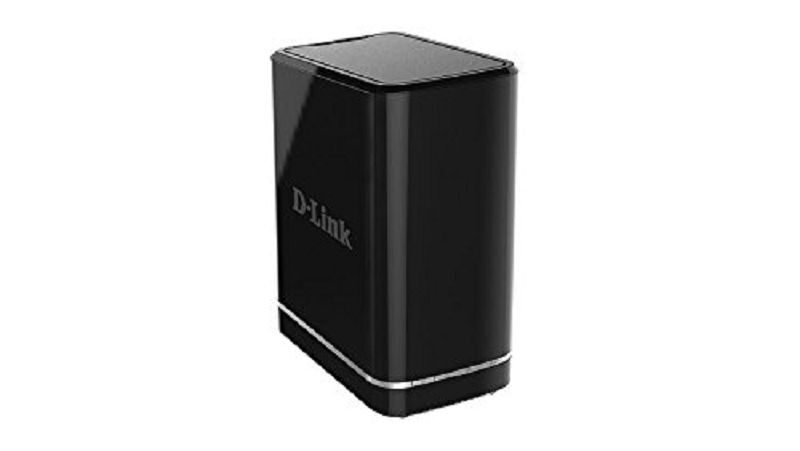
D-LINK DNS-722-4 2-Bay NVR Network Video Recorder Security Camera
Storage NASUSD $136.90
Condition : New
Free Shipping
{{variant_type_name}} :

Notify me when the price drops
We will email you if we find a lower price on this product!
D-LINK DNS-722-4
2-Bay NVR Network Video Recorder Security Camera Storage NAS
**NEW ORIGINAL RETAIL BOX BRAND**
Network Video Recorder (NVR) is a good alternative to expensive, outdated analog surveillance systems CCTV. Together with the multi-functional IP-based cameras D-Link, with a broad range of functions and high-resolution video recorder NVR provides a video display screen with good quality. This device also serves as data storage and management software is the solution. Video Recorder (NVR), being a low-cost device monitoring system supports an integrated remote monitoring of high quality.
Online Surveillance
Intuitive User Interface D-Link makes it easy to view from the NVR as recorded and transmitted in real-time video. Status page displays the connection status of the camera and recording, as well as frame rate and bit rate information for each camera. The total amount of time available for recording, is also displayed for each NVR.
Real-time monitoring and camera settings
The users have a wide range of options for viewing and organizing footage on the screen. In a system with multiple channels, users can use the mouse to move the selected camera in the viewing area. To simplify the identification of the names of cameras and recording status are displayed on the screen (OSD). Pre-installed in the interface can be used to instantly restore a previously saved settings.
You can view video from a camera in full screen mode with a two-way transmission of audio (optional). Users can control the functions of the PTZ - pan / tilt / zoom (pan / tilt / zoom), using the interface buttons or by directly clicking on the video.
Expanded Function Entries
Convenient single-page interface assists in such settings, compression, resolution and frame rate for all connected cameras. The NVR will record video with a 4-local and / or remote IP-based cameras. You can combine up to 4 devices, NVR and manage them using the software D-Link 16-channel system.
If the cameras have been installed, the system is set up the schedule allows for continuous recording or recording at the designated time intervals. Each camera can be set to record independently at preset intervals. The DNS-726-4 also provides a record of events based on certain triggering events launchers.
The NVR can be configured on the phone to automatically replace old data with new, in the case of filling the space on your hard disk, leaving the possibility of continuous recording. Users can determine the number of days of recording, which should be preserved (hard disk). NVR supports memory, video recording allows you to save the last 7 days, will continue to use the phone to automatically rewrite. Moreover, the NVR will record data recorded on the 8th day, the place of the video, filmed in 1 day.
The NVR provides a function stop recording when disk space is full. Notification of the need to free up space on your hard disk can be sent by e-mail or to an external device such as a sound signal is transmitted to emergency situations or modify the values of indicators, which reflect the events via DI / DO.
Advanced Event Management System
The NVR provides centralized management of digital output, notifications by e-mail and write to all connected cameras. Also you can optionally monitor the motion detection and sensor interface, digital input status. These events are logged with optional notifications by e-mail or via the external device. Users can have multiple contact lists, which will be sent notification of events. A simple and effective system to log events by date for easy playback.
Intelligent Playback
The process of searching the recorded data can be tedious and frustrating. However, the Smart Search feature allows you to find the NVR information relevant events, without any special effort. Selecting the necessary video and setting the sensitive search, using the Smart Search, you can view the database based on specific search criteria and noteworthy events. Search criteria include options such as motion detection, object, or loss of focus, as well as darkening of the camera (only for DNS-726-4).
After selecting the required period video playback device immediately starts playing. The DNS-726-4 supports simultaneous playback of 4 channels, and DNS-722-4 - a single channel. Playback speed control allows you to rewind or view records in the reverse direction with a 16-fold increase in speed. When rewinding step displays one frame at a time. In addition, users can improve the quality of the recorded video by controlling the brightness, contrast and sharpness.
NVR supports export video in two formats. AVI format allows you to export the raw video. ASF format takes time to mark the exported video. If the user is connected to a computer printer, with the NVR can print the selected frame.
Complete data and security hardware
Device D-Link NVR provides the security and integrity of the footage on the IP-camera material. Administrators can filter the external connections to the NVR for IP-address, restricting access and thereby improving safety. Administrators can also select the access privileges for users, by defining the chamber, which can be accessed for viewing online video, audio, and playback functions of PTZ.
Recorded data is stored in a secure database. This recorded data can be stored on a secondary storage device periodically or as needed. NVR also includes an option to protect your data with RAID 1 configuration. RAID 1 duplicates the database on two different disk. In the event of damage to a single hard disk, data is stored on the second hard disk.
Uninterruptible Power Supply (UPS) can be used as an emergency power source for the NVR. UPS via USB-interface to notify the NVR on the need to shutdown before battery power runs out. In the event of power failure the UPS without NVR restarts automatically when power is restored.
Of course, in addition to protecting data, it is necessary to protect the device from being stolen. The device is made in a compact package and can easily be installed in a remote secure location. The front panel is equipped with a lock to protect the hard disk, while the lock on the rear panel allows you to protect the cable from the NVR.
An integrated network functionality
Video D-Link NVR takes advantage of existing network architecture, features such as PPPoE and ADSL-service. NVR can request IP-address from DHCP-server. For systems that operate without a fixed IP-address, supports Dynamic DNS. You can access the NVR remotely via the Internet, using easy to remember domain name service provided by DDNS.
Support for the exact time the system is particularly important if the recorded video used as evidence. To ensure accurate continuous-time NVR can update the system clock using the Internet server using the Network Time Protocol (NTP).
Software D-ViewCam NVR
Software D-ViewCam NVR, bundled, consists of three main components: Playback Manager (Manager of play), Backup Manager (Backup Manager), and File Manager (File Manager) and Multi-NVR Viewer (View multiple NVR .) "Multi-NVR Viewer" one supports the simultaneous display of 16 channels. You can easily organize a view by dragging the video window display. The cameras, operated NVR, available for viewing as individual sites or distributed in groups according to categories.
The function "Playback Manager" (playing manager) includes a Web-based interface that allows users to play back video as well as to search for it, or export. "Backup and File Manager" (file manager and backup manager) - a flexible tool for backup, which simplifies the process of copying the video data from the NVR to an external storage device.
Installing the network using the D-Link NVR
Operating system
• Linux
Supported cameras
• Supports all network cameras D-Link. Includes support for automatic detection and resolution to 1.3 Megapixels.
Recording speed
• Up to 120fps (NTSC) / 100fps (PAL) for D1
Search for the camera
• UPnP
Recording Audio and Video
• Record synchronized audio and video
Compression Format
• MPEG-4, M-JPEG (on supported cameras)
Setting up Video
• Resolution, quality, frame rate, to include audio, go to the camera interface
Type of record
• Scheduled recording manually
• Remote viewing of video in real time
• Support for remote viewing via Internet Explorer
• Maximum number of simultaneous channels viewed - 4
Managing remote video in real time
• Video in real time, preset (preset) / go (go), control, focus, function PTZ, remote IO (only the DNS-726-4), freeze-frame, full-screen mode, digital zoom
Managing remote playback
• Playing with the functions of the usual rewind, fast forward / backward and step forward / backward
• Intelligent detection Smart Search (for DNS-726-4): General Motion (basic movement), Missing Object (lost object), Foreign Object (unfamiliar object), Camera Occlusion (Blackout camera), Lose Focus (Losing focus)
Remote playback
• Playing through Internet Explorer and the NVR-client
• System of playing with the scale of time, searching for the event, area, cameras, date and time
• IE and NVR-client support playback of a single channel
• Digital zoom a particular area
Function overwrite (Dubbing)
• Auto recycling when a crowded hard drive space
Exporting files
• Export of video files to AVI or ASF (ASF marked time)
• Export of video files to BMP, and JPG
User account
• You can create additional user accounts to allow users access to the system, as well as to determine authorization for channels cameras, PTZ, etc.
DDNS
• Support DDNS-server D-Link
System time
• Setting the system time (D-Link NTP, time entry, sync with your computer, saving time)
Remote backup
• Remote software can create a backup copy of the raw data on a secondary storage device
System status
• Status cameras, System Status
Network service
• IPV4, ARP, TCP, UDP, ICMP
• DHCP-client
• NTP-client (D-Link)
• DNS-client
• DDNS-client (D-Link)
• SMPT-client
• HTTP-server
• PPPoE
• UPnP
• Filtering IP-addresses
User interface
• Internet Explorer v6 or higher
• NVR Search Tool
Standards
• IEEE 802.3/u/z
• Auto MDI / MDI-X
• SATA I, II
HDD (Hard Disk)
• Control your hard drive and control a computer
• Reformatting a hard disk
• RAID 0, 1
• JBOD
Two modes of reset (reset to factory settings)
• Button Reset firmware GUI (reset the firmware to factory settings)
• Button HW Reset (Hardware Reset to factory settings), you must hold for 5 seconds
Flash ROM
• 32MB
RAM
• 128MB DDR
Network Interface
• LAN-port Gigabit Ethernet (10/100/1000 Mbit / s)
I/O ports
• Port RJ45 x 1
• Connector DC-in x1
• USB-port for updating the status of the UPS (optional)
Power adapter
• 3A 12VDC, 5V DC 3A
Reset button
• Resetting to factory default settings
Security
• Lock the front panel
• Lock the device
Delivery
• DVR NVR with two compartments
• Power Adapter
• Ethernet Cable
• Quick Installation Guide
• Clamp the power cable
• Keys
• CD-ROM c:
- Software
- Product documentation
Functions
• Simultaneous playback of 1 channel
• View the video in real time
• Support for UPS w / USB
• Export of images / video
• Physical Security
• Support for RAID
• Remote backup
• Scheduled Recording / Manual
• Support for Camera D-Link נתונים פיזיים
Power consumption
• Max. amount of energy consumed: 23.59 Watt
• Max. amount of energy consumed in mode standby: 7,26 Watt
Dimensions
• 198 x 104 x 132
Weight
• 1.23 kg
Temperature
• Operating: 0 ˚ to 55 ˚ C
• Storage: -20 ˚ to 70 ˚ C
Humidity
• Operating: 5% to 90% (no condensation)
**NEW ORIGINAL RETAIL BOX BRAND**
Network Video Recorder (NVR) is a good alternative to expensive, outdated analog surveillance systems CCTV. Together with the multi-functional IP-based cameras D-Link, with a broad range of functions and high-resolution video recorder NVR provides a video display screen with good quality. This device also serves as data storage and management software is the solution. Video Recorder (NVR), being a low-cost device monitoring system supports an integrated remote monitoring of high quality.
Online Surveillance
Intuitive User Interface D-Link makes it easy to view from the NVR as recorded and transmitted in real-time video. Status page displays the connection status of the camera and recording, as well as frame rate and bit rate information for each camera. The total amount of time available for recording, is also displayed for each NVR.
Real-time monitoring and camera settings
The users have a wide range of options for viewing and organizing footage on the screen. In a system with multiple channels, users can use the mouse to move the selected camera in the viewing area. To simplify the identification of the names of cameras and recording status are displayed on the screen (OSD). Pre-installed in the interface can be used to instantly restore a previously saved settings.
You can view video from a camera in full screen mode with a two-way transmission of audio (optional). Users can control the functions of the PTZ - pan / tilt / zoom (pan / tilt / zoom), using the interface buttons or by directly clicking on the video.
Expanded Function Entries
Convenient single-page interface assists in such settings, compression, resolution and frame rate for all connected cameras. The NVR will record video with a 4-local and / or remote IP-based cameras. You can combine up to 4 devices, NVR and manage them using the software D-Link 16-channel system.
If the cameras have been installed, the system is set up the schedule allows for continuous recording or recording at the designated time intervals. Each camera can be set to record independently at preset intervals. The DNS-726-4 also provides a record of events based on certain triggering events launchers.
The NVR can be configured on the phone to automatically replace old data with new, in the case of filling the space on your hard disk, leaving the possibility of continuous recording. Users can determine the number of days of recording, which should be preserved (hard disk). NVR supports memory, video recording allows you to save the last 7 days, will continue to use the phone to automatically rewrite. Moreover, the NVR will record data recorded on the 8th day, the place of the video, filmed in 1 day.
The NVR provides a function stop recording when disk space is full. Notification of the need to free up space on your hard disk can be sent by e-mail or to an external device such as a sound signal is transmitted to emergency situations or modify the values of indicators, which reflect the events via DI / DO.
Advanced Event Management System
The NVR provides centralized management of digital output, notifications by e-mail and write to all connected cameras. Also you can optionally monitor the motion detection and sensor interface, digital input status. These events are logged with optional notifications by e-mail or via the external device. Users can have multiple contact lists, which will be sent notification of events. A simple and effective system to log events by date for easy playback.
Intelligent Playback
The process of searching the recorded data can be tedious and frustrating. However, the Smart Search feature allows you to find the NVR information relevant events, without any special effort. Selecting the necessary video and setting the sensitive search, using the Smart Search, you can view the database based on specific search criteria and noteworthy events. Search criteria include options such as motion detection, object, or loss of focus, as well as darkening of the camera (only for DNS-726-4).
After selecting the required period video playback device immediately starts playing. The DNS-726-4 supports simultaneous playback of 4 channels, and DNS-722-4 - a single channel. Playback speed control allows you to rewind or view records in the reverse direction with a 16-fold increase in speed. When rewinding step displays one frame at a time. In addition, users can improve the quality of the recorded video by controlling the brightness, contrast and sharpness.
NVR supports export video in two formats. AVI format allows you to export the raw video. ASF format takes time to mark the exported video. If the user is connected to a computer printer, with the NVR can print the selected frame.
Complete data and security hardware
Device D-Link NVR provides the security and integrity of the footage on the IP-camera material. Administrators can filter the external connections to the NVR for IP-address, restricting access and thereby improving safety. Administrators can also select the access privileges for users, by defining the chamber, which can be accessed for viewing online video, audio, and playback functions of PTZ.
Recorded data is stored in a secure database. This recorded data can be stored on a secondary storage device periodically or as needed. NVR also includes an option to protect your data with RAID 1 configuration. RAID 1 duplicates the database on two different disk. In the event of damage to a single hard disk, data is stored on the second hard disk.
Uninterruptible Power Supply (UPS) can be used as an emergency power source for the NVR. UPS via USB-interface to notify the NVR on the need to shutdown before battery power runs out. In the event of power failure the UPS without NVR restarts automatically when power is restored.
Of course, in addition to protecting data, it is necessary to protect the device from being stolen. The device is made in a compact package and can easily be installed in a remote secure location. The front panel is equipped with a lock to protect the hard disk, while the lock on the rear panel allows you to protect the cable from the NVR.
An integrated network functionality
Video D-Link NVR takes advantage of existing network architecture, features such as PPPoE and ADSL-service. NVR can request IP-address from DHCP-server. For systems that operate without a fixed IP-address, supports Dynamic DNS. You can access the NVR remotely via the Internet, using easy to remember domain name service provided by DDNS.
Support for the exact time the system is particularly important if the recorded video used as evidence. To ensure accurate continuous-time NVR can update the system clock using the Internet server using the Network Time Protocol (NTP).
Software D-ViewCam NVR
Software D-ViewCam NVR, bundled, consists of three main components: Playback Manager (Manager of play), Backup Manager (Backup Manager), and File Manager (File Manager) and Multi-NVR Viewer (View multiple NVR .) "Multi-NVR Viewer" one supports the simultaneous display of 16 channels. You can easily organize a view by dragging the video window display. The cameras, operated NVR, available for viewing as individual sites or distributed in groups according to categories.
The function "Playback Manager" (playing manager) includes a Web-based interface that allows users to play back video as well as to search for it, or export. "Backup and File Manager" (file manager and backup manager) - a flexible tool for backup, which simplifies the process of copying the video data from the NVR to an external storage device.
Installing the network using the D-Link NVR
Operating system
• Linux
Supported cameras
• Supports all network cameras D-Link. Includes support for automatic detection and resolution to 1.3 Megapixels.
Recording speed
• Up to 120fps (NTSC) / 100fps (PAL) for D1
Search for the camera
• UPnP
Recording Audio and Video
• Record synchronized audio and video
Compression Format
• MPEG-4, M-JPEG (on supported cameras)
Setting up Video
• Resolution, quality, frame rate, to include audio, go to the camera interface
Type of record
• Scheduled recording manually
• Remote viewing of video in real time
• Support for remote viewing via Internet Explorer
• Maximum number of simultaneous channels viewed - 4
Managing remote video in real time
• Video in real time, preset (preset) / go (go), control, focus, function PTZ, remote IO (only the DNS-726-4), freeze-frame, full-screen mode, digital zoom
Managing remote playback
• Playing with the functions of the usual rewind, fast forward / backward and step forward / backward
• Intelligent detection Smart Search (for DNS-726-4): General Motion (basic movement), Missing Object (lost object), Foreign Object (unfamiliar object), Camera Occlusion (Blackout camera), Lose Focus (Losing focus)
Remote playback
• Playing through Internet Explorer and the NVR-client
• System of playing with the scale of time, searching for the event, area, cameras, date and time
• IE and NVR-client support playback of a single channel
• Digital zoom a particular area
Function overwrite (Dubbing)
• Auto recycling when a crowded hard drive space
Exporting files
• Export of video files to AVI or ASF (ASF marked time)
• Export of video files to BMP, and JPG
User account
• You can create additional user accounts to allow users access to the system, as well as to determine authorization for channels cameras, PTZ, etc.
DDNS
• Support DDNS-server D-Link
System time
• Setting the system time (D-Link NTP, time entry, sync with your computer, saving time)
Remote backup
• Remote software can create a backup copy of the raw data on a secondary storage device
System status
• Status cameras, System Status
Network service
• IPV4, ARP, TCP, UDP, ICMP
• DHCP-client
• NTP-client (D-Link)
• DNS-client
• DDNS-client (D-Link)
• SMPT-client
• HTTP-server
• PPPoE
• UPnP
• Filtering IP-addresses
User interface
• Internet Explorer v6 or higher
• NVR Search Tool
Standards
• IEEE 802.3/u/z
• Auto MDI / MDI-X
• SATA I, II
HDD (Hard Disk)
• Control your hard drive and control a computer
• Reformatting a hard disk
• RAID 0, 1
• JBOD
Two modes of reset (reset to factory settings)
• Button Reset firmware GUI (reset the firmware to factory settings)
• Button HW Reset (Hardware Reset to factory settings), you must hold for 5 seconds
Flash ROM
• 32MB
RAM
• 128MB DDR
Network Interface
• LAN-port Gigabit Ethernet (10/100/1000 Mbit / s)
I/O ports
• Port RJ45 x 1
• Connector DC-in x1
• USB-port for updating the status of the UPS (optional)
Power adapter
• 3A 12VDC, 5V DC 3A
Reset button
• Resetting to factory default settings
Security
• Lock the front panel
• Lock the device
Delivery
• DVR NVR with two compartments
• Power Adapter
• Ethernet Cable
• Quick Installation Guide
• Clamp the power cable
• Keys
• CD-ROM c:
- Software
- Product documentation
Functions
• Simultaneous playback of 1 channel
• View the video in real time
• Support for UPS w / USB
• Export of images / video
• Physical Security
• Support for RAID
• Remote backup
• Scheduled Recording / Manual
• Support for Camera D-Link נתונים פיזיים
Power consumption
• Max. amount of energy consumed: 23.59 Watt
• Max. amount of energy consumed in mode standby: 7,26 Watt
Dimensions
• 198 x 104 x 132
Weight
• 1.23 kg
Temperature
• Operating: 0 ˚ to 55 ˚ C
• Storage: -20 ˚ to 70 ˚ C
Humidity
• Operating: 5% to 90% (no condensation)
Returns Accepted for this item if it's within 30 Days

Price type
IN STOCK
OUT STOCK

D-Link DNR-322L Professional Network Video Recorder W/Power Adapter,One Hardrive
By Unbranded
![]()
$99.99






 .
